Contents
Best way to learn a library? Study how experts are using it 💁🏼♂️
This week I explored effect-openai, an Effect wrapper of the OpenAI API, developed by the core team of Effect 🔥
This is how I learn from someone else's code 🥷
When reading is better than writing
When you are new to a library you don't know the full extent of its API. You don't know how to use it in practice 🤔
As you discover more methods, you start using them over and over again.
This creates a tendency to explore less, since the few methods you know may be enough for your usecase.
Solution: read how someone else is using the same library (even better if the code is from the core maintainers of the library itself 💁🏼♂️)
Effect OpenAI
This is what I did:
- Clone repository locally
- Install environment and dependencies
- Start reading the code from the entry file (
bin.ts)
Every file imports other files: I use VSCode to open and read each imported file 💁🏼♂️
import * as DevTools from "@effect/experimental/DevTools"
import * as NodeContext from "@effect/platform-node/NodeContext"
import * as NodeRuntime from "@effect/platform-node/NodeRuntime"
import * as Config from "effect/Config"
import * as ConfigProvider from "effect/ConfigProvider"
import * as Effect from "effect/Effect"
import * as Layer from "effect/Layer"
import * as Cli from "./Cli.js"
import * as OpenAI from "./OpenAI.js"
Look for patterns
Naturally you should recognize some methods, while others will be completely new.
Instead of looking at specific functions, try to recognize patterns and best practices.
/// Pattern 1: Errors ⛔️
export class OpenAIError extends Data.TaggedError("OpenAIError")<{
  readonly error: unknown
}> {}

/// Pattern 2: Options/Configuration 🛠️
export interface OpenAIOptions {
  readonly apiKey: Secret.Secret
  readonly organization: Option.Option<Secret.Secret>
}

/// Pattern 3: Implementation 💻
const make = (options: OpenAIOptions) =>
  Effect.gen(function*(_) {
    /// ...
  })

/// Pattern 4: Dependency injection 💉
export class OpenAI extends Context.Tag("@services/OpenAI")<
  OpenAI,
  Effect.Effect.Success<ReturnType<typeof make>>
>() {
  static readonly Live = (config: Config.Config.Wrap<OpenAIOptions>) => /// ...
}
This is where you refine your previous knowledge and learn new methods.
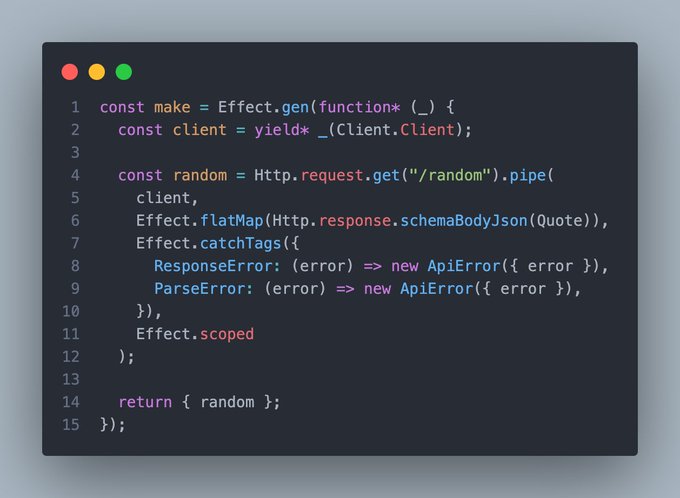
Extra points if at the same time you share what you learn (this is what I do on X) 🤝

💡 @EffectTS_ How to 💡 Implement your own API ✅ Response schema validation ✅ Http client ✅ Error messages This is how 👇 Show more
Reimplement a similar usecase
Knowledge is not enough. We need practice 🛠️
Take new methods and patterns and reimplement and example project to test your understanding
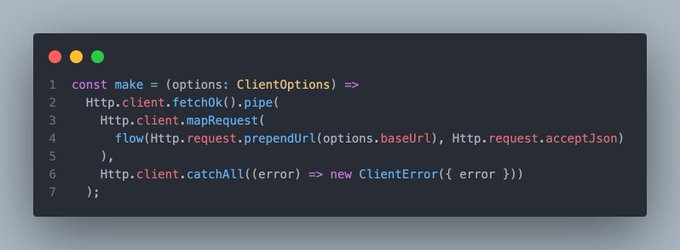
This time I created an API client using the same pattern as above 👇
/// Pattern 1: Errors ⛔️
class ClientError extends Data.TaggedError("ClientError")<{
  error: Http.error.HttpClientError;
}> {}

/// Pattern 2: Options/Configuration 🛠️
export interface ClientOptions {
  baseUrl: string;
}

/// Pattern 3: Implementation 💻
const make = (options: ClientOptions) => /// ...

/// Pattern 4: Dependency injection 💉
export class Client extends Context.Tag("Client")<
  Client,
  ReturnType<typeof make>
>() {
  static readonly Live = (config: Config.Config.Wrap<ClientOptions>) => /// ...
}💡 @EffectTS_ How to 💡 Create a custom Http Client service ✅ Check valid fetch status ✅ Custom configuration ✅ Error handling ✅ Testable Here is how step by step 👇 Show more
Bonus tips
Tip 1: Ask for help
Open an issue or contact directly the author of the repository. Most often than not people are more than willing to help and share ideas 👌
Tip 2: Read tests
When a method is unclear, the best way to focus specifically on how it works are tests. By definition a test aims to be the smallest example to verify a function. This makes it ideal for learning 💡
Tip 3: Ignore
Not everything is relevant to you, no need to read all the code. Focus more on what you can use in your projects.
Every once in a while it's good to write less and read more.
Nonetheless, the best way to learn programming is practice: after reading go ahead and start building 🚀
Some updates planned for the blog (what about step by step tutorial series?) and new open source updates (what about Effect in dart?). Stay tuned 🛜
See you next 👋